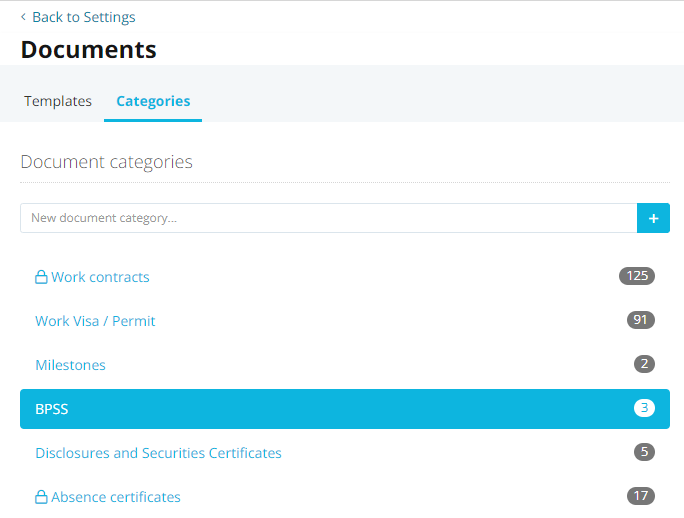
I’m haivng trouble finding the 3 instances where we have the BPSS Document Type in use..
I have tried using the Report ‘Custom Report’ but it doesn’t allow to search Document Categories from what I have found.
I want to tidy up our Categories and streamline this but for the life of me I can’t find where these 3 files under BPSS are… is there an easy way to find it or do I need to go into each employee individually?
This also is another use case for having the ability to report on Documents and Documents Metadata. @Andrea
Link to proposed solution found in other Document Storage solutions
If any of you have the solution - appreciate your help.
Best answer by Andrea
Hi @JHBEM,
I do understand the need of reporting data regarding documents with your last posts. Thanks for the details, I am happy that Conor reached out to you on your idea mentioned above 😊.
In order to see in which profiles there are documents on your categoryBPSS, there are two options:
Checking in your employee profiles: at the moment there is no report that shows this information, so you would need to take a look in your employees’ profiles. Don’t forget to check employees on status inactive and on leave.
Undertaking an export of company data: Within the export, a separate folder for each employee is created in the zip file, containing all documents sorted by different categories.
The following idea might describe a suitable solution for this case:
As always, feel free to vote for it!
Let me know if I can clarify anything else for you.
I do understand the need of reporting data regarding documents with your last posts. Thanks for the details, I am happy that Conor reached out to you on your idea mentioned above 😊.
In order to see in which profiles there are documents on your categoryBPSS, there are two options:
Checking in your employee profiles: at the moment there is no report that shows this information, so you would need to take a look in your employees’ profiles. Don’t forget to check employees on status inactive and on leave.
Undertaking an export of company data: Within the export, a separate folder for each employee is created in the zip file, containing all documents sorted by different categories.
The following idea might describe a suitable solution for this case:
As always, feel free to vote for it!
Let me know if I can clarify anything else for you.
It does answer the question - although not the solution I was hoping for…
i.e. didn’t want to have to go into each individual’s Document record to find out who (active and inactive) has these documents….
I am not sure what is faster.. as I just want to move the file from one Document Category to another and then remove the BPSS document category altogether.
⚠️Heads up! This thread could be outdated
This topic was created more than ago. Our product evolves fast – feel free to ask a new question to make sure you get the latest info.
Join the Personio Voyager Community!
If you are a Personio customer please use the same email address for registration as in your Personio account. By doing so we can help you faster if we might need to check something in your account.
Do you already have an account? > Login
! Your public username cannot contain any personal information such as email or other private information! You can't change your username after registration.