
Answered

How do you stop a workflow?

  • August 12, 2024
  • 7 replies
  • 57 views

CVC
Follower
Forum|alt.badge.img+2

I have created a test person to test a specific thing, but realised this has activated a workflow I set up. I don’t need this workflow to run as it will start emailing people. How to I stop a workflow, mid-flow?

Best answer by Sofia V.

Hi @CVC,

If this workflow was created in Automations, you can turn off this workflow by going to Automations > Workflows > Look here for the relevant workflow > click on the 3 dots in the left > Deactivate workflow:
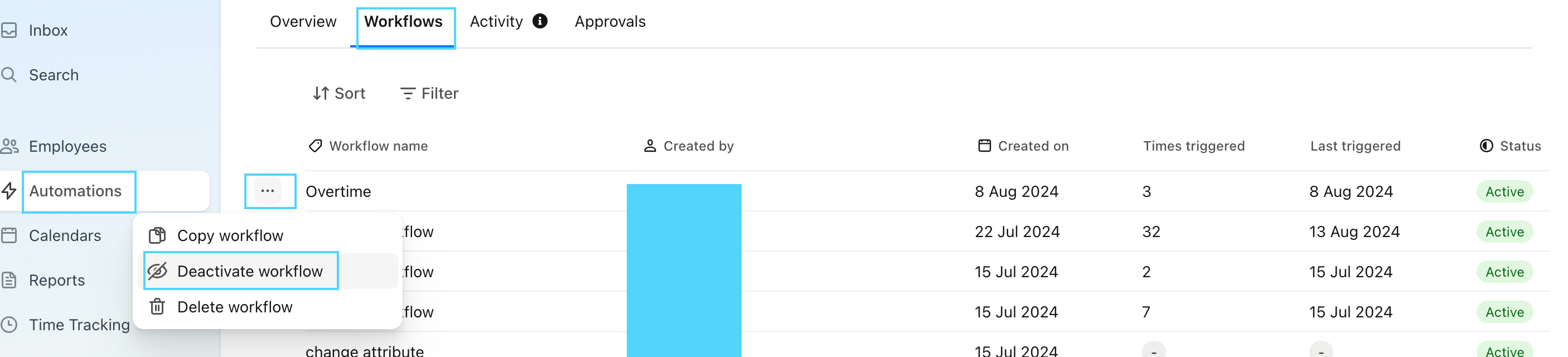
 

Here you will find more information regarding: Create workflows.

Best,

Sofia

7 replies

Sofia V.
Personio Employee
Forum|alt.badge.img+5
  • Former Community Moderator
  • Answer
  • August 13, 2024

Hi @CVC,

If this workflow was created in Automations, you can turn off this workflow by going to Automations > Workflows > Look here for the relevant workflow > click on the 3 dots in the left > Deactivate workflow:
 

Here you will find more information regarding: Create workflows.

Best,

Sofia


CVC
Follower
Forum|alt.badge.img+2
  • Author
  • Follower
  • August 19, 2024

Thanks Sofia - but I think this will completely deactivate it? I want to deactivate/cancel a particular incidence that is running at the moment. 


Sofia V.
Personio Employee
Forum|alt.badge.img+5
  • Former Community Moderator
  • August 21, 2024

Hi @CVC,

Yes, this will deactivate that relevant workflow. Could you please specify what workflow you would like to deactivate?

Best,

Sofia


CVC
Follower
Forum|alt.badge.img+2
  • Author
  • Follower
  • August 22, 2024

So I added 3 “test” people onto the system so managers could play with a new performance development form I had created, without involving real staff. I forgot that creating new staff, even test ones, triggers my “pre boarding flow” LOL. It’s not a massive deal but if I tick my tasks it’s going to start emailing all sorts of things out to people which will be confusing!


Sofia V.
Personio Employee
Forum|alt.badge.img+5
  • Former Community Moderator
  • August 26, 2024

Hi @CVC,

Can you please sent me a print screen of the Workflow that you have created, would like to see if you can add a condition in that Workflow in order not to trigger this Workflow for test profiles.
(Please don’t share sensitive data if you share a print screen, no names of employees or Company)

Best,

Sofia 


People Person
Communicator
Forum|alt.badge.img+10

Hi Sofia, 


There is no other way to stop the workflow once it has started other than to deactivate it. If no one else is going through the workflow currently, you can always reactivate it straight after once you know the test related workflows have stopped. 


In the future I would just temporarily deactive the workflow whilst adding the test people and then turn it back on when you’re done. 


All the best, 


Zoe 


Sofia V.
Personio Employee
Forum|alt.badge.img+5
  • Former Community Moderator
  • August 28, 2024

Hi @People Person,

There is also the possibility to edit an existing Workflow or the option to deactivated it temporary.

Here you will find more information regarding: Create workflows.

Best,

Sofia