

Review your Time Management for a successful 2026: Your Q1 Checklist for Absences and Time Management

  • January 26, 2026
  • 5 replies
  • 71 views
Daniele
Community Admin
Forum|alt.badge.img+23

Dear Community,

As you might have already learned from our email about time management, we would like to give you tips for a successful start to 2026.

As your teams settle into the new year, now is the perfect moment to double‑check a few key Absence and Time Management settings to ensure everything runs smoothly for the year ahead.

Here are your recommended checks:


1) Review and adjust your carryover settings

If you want to add or remove carryover days from your employees’ current year’s balance or update expiry rules, now is a good time to ensure your policies match your internal guidelines: Edit carryover settings for time off

2) Report on remaining time off and entitlements

Check employees’ remaining balances and entitlements to see exactly what has carried over into 2026. To gain clear insights on how many vacation days employees carried over into 2026, use the classic report builder in your Analytics section to generate a Point-in-time report and add Paid vacation - carryover from previous year as an additional table column. 

 Soon,  this will also be available in our new Report Builder for more flexibility and additional metrics. More info to come!

 3) Set up reminders for carried-over vacation days 

In Germany, organizations must inform their employees about expiring vacation days, otherwise the days are not officially allowed to expire. Use our workflow template to conveniently send an automatic reminder to your employees: Create a Reminder

Best,

Your Personio Team


P.S.: For questions & tips, continue in the comments! ⬇️​​


5 replies

Daniele
Community Admin
Forum|alt.badge.img+23
  • Author
  • Community Admin
  • January 27, 2026

Now it's your turn:
How do you handle Time Management efficiently at your company?

Feel free to share your tips & tricks and insights so that other members can benefit.
Do you still need help or advice? Then ask the community here! ⬇️


Is it possible to create automations for expiring time off, where the trigger is linked to the expiring date? We have different time off schemes and they expire on different dates. It would be great if the automation can look at the expiring date and then send an automation email x amount of days before.


Forum|alt.badge.img+2
  • Community Moderator
  • January 29, 2026

Hi ​@Chantal TSC Life ,


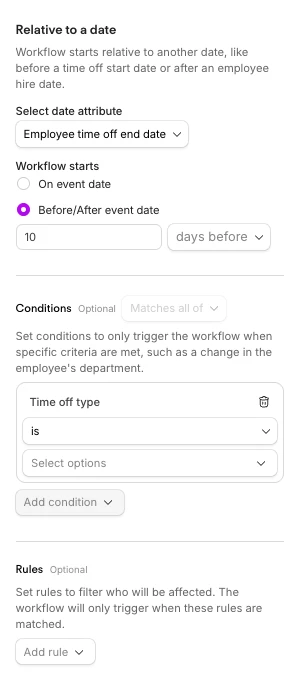
that should be possible using our workflow automations. Here you find an example that you can use:

That should do the trick. :)


Hope that helps!

All the best

Michael


Hi Michael,

I believe this automation is only good for already taken or requested time off. I would like the automation to work for the time off balance, that has an expiring date in the future.

Say 3 days of my total paid holidays will expire March 1st, I would like to receive a notification to not forget and take leave when possible.

Is that an option in Personio?


Forum|alt.badge.img+2
  • Community Moderator
  • January 30, 2026

Hi ​@Chantal TSC Life,

triggering a workflow on a time off entitlement expiry is a functionality our product currently cannot offer. A common best practice is an overall “reminder” workflow that is set on a specific date (e.g.: 1st July annually) including a rather generic message to check if you have any leftover vacation days and if so → plan them. This is in line with the idea Daniele posted above.

Your take is a nice idea though! Feel free to drop it in our in-product feedback channel. That is the best channel to send feedback over to our product teams.


All the best