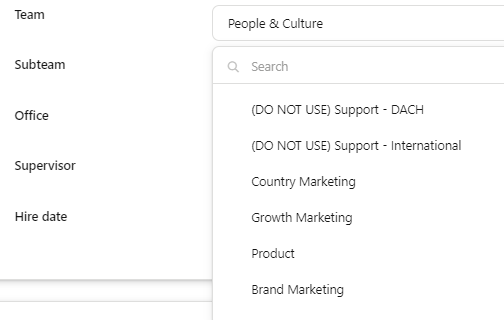
We have changed our organizational structure and changed/created new departments and teams.
We want keep the old departments and teams to keep the historical data and correct reporting. However, we don’t want them to be visible anymore in the drop down list for teams.
We have now, labeled them as (DO NOT USE) teams, but this is note a scalable way of working. As shown in the print screen below.
Does anyone have an idea or solution on how to fix this?
Best answer by International Support Team
Hey @Tim
At the moment, your solution is the best workaround to clearly outline not to use these Departments and Teams going forward. What would be ideal in this situation is an archive option to stop the options showing, however the ability to pull reports on these old attributes. Now one major point to keep in mind, please do not delete Departments. The Department attribute is directly linked to the weekly hours attribute and deleting this can cause issues in salary calculations retrospectively.
We have had another user post a similar idea into our Ideation Area, so I would kindly ask that you upvote and comment on this post. It will give further visibility to our Product Team to the issue and hopefully in future it can be improved.
If there is anything else I can help with, please let me know.
At the moment, your solution is the best workaround to clearly outline not to use these Departments and Teams going forward. What would be ideal in this situation is an archive option to stop the options showing, however the ability to pull reports on these old attributes. Now one major point to keep in mind, please do not delete Departments. The Department attribute is directly linked to the weekly hours attribute and deleting this can cause issues in salary calculations retrospectively.
We have had another user post a similar idea into our Ideation Area, so I would kindly ask that you upvote and comment on this post. It will give further visibility to our Product Team to the issue and hopefully in future it can be improved.
If there is anything else I can help with, please let me know.
This topic was created more than ago. Our product evolves fast – feel free to ask a new question to make sure you get the latest info.
Join the Personio Voyager Community!
If you are a Personio customer please use the same email address for registration as in your Personio account. By doing so we can help you faster if we might need to check something in your account.
Do you already have an account? > Login
! Your public username cannot contain any personal information such as email or other private information! You can't change your username after registration.