Answered

HOW TO SHOW PAID VACATION ON ATTENDANCE TIMESHEET FOR WORKING STUDENT

  • December 17, 2025
  • 1 reply
  • 22 views

Forum|alt.badge.img

Dear Personio Community, 

I am having the problem with attendance visibility for working students. 

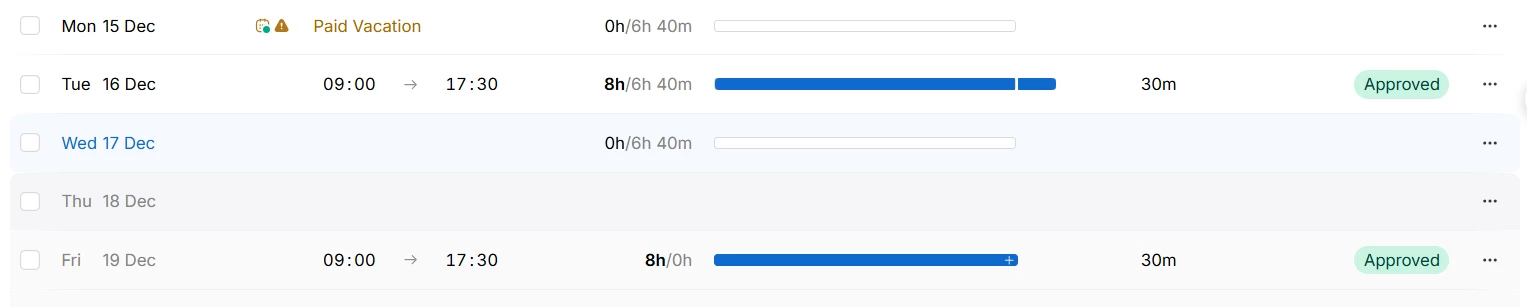
A working student who has recorded/ registered his paid vacation. But it’s not shown correctly in the timesheet. Do you know how we can make the hourly shown correctly for paid vacation day? If not, HR team will need to enter it manually by the end of the month. 


Thank you so much for your support!


Have a nice day!

Best answer by KatharinaS.

Hi ​@Nhi Cao,

if a time off period is regarded as a real absence, depends on the setting Reduce target hours and count any time tracked as overtime during time off? within the time off type.

I copied the definition from our help center article

We recommend enabling this option for all your standard time off types. For example: paid vacation and sick leave. When enabled:

  • Any working time the employee tracks during these time off types counts as overtime.
  • Approved time off displays as time off in the Attendance tab.
  • Employees don't receive automatic deficit hours when they don't track time during these time off types.
  • Employees on an hourly wage get their normal pay for the hours they’re absent.

Disable this option for productive time off, such as work from home or training.


So I would recommend to set this setting to Yes. Please note that the change will be applied retroactively and overtime will be recalculated for the last 3 months. This change will apply to all employees who have taken this time off type.

Best,

Katharina

1 reply

KatharinaS.
Community Moderator
Forum|alt.badge.img+3
  • Community Moderator
  • Answer
  • December 19, 2025

Hi ​@Nhi Cao,

if a time off period is regarded as a real absence, depends on the setting Reduce target hours and count any time tracked as overtime during time off? within the time off type.

I copied the definition from our help center article

We recommend enabling this option for all your standard time off types. For example: paid vacation and sick leave. When enabled:

  • Any working time the employee tracks during these time off types counts as overtime.
  • Approved time off displays as time off in the Attendance tab.
  • Employees don't receive automatic deficit hours when they don't track time during these time off types.
  • Employees on an hourly wage get their normal pay for the hours they’re absent.

Disable this option for productive time off, such as work from home or training.


So I would recommend to set this setting to Yes. Please note that the change will be applied retroactively and overtime will be recalculated for the last 3 months. This change will apply to all employees who have taken this time off type.

Best,

Katharina