Question

Submitting work schedule

  • December 3, 2025
  • 4 replies
  • 27 views

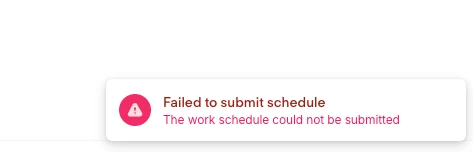
New to the community and tool- we are preparing for the full roll out and from a user perspective, after meeting the role requirements (hours allotted and days working per week), I continued to receive this error after clicking submit. None of the buttons were grayed out and I was able to select the submit button but this failed message persisted. Has anyone else received this issue? 

4 replies

SabbuSchreiber
Helping Hand
Forum|alt.badge.img+14

Hi ​@Rnylander,

I’ve never seen this error message. Could you share some more details or screenshots as to what you wanted to setup and how?


Daniele
Community Admin
Forum|alt.badge.img+23
  • Community Admin
  • December 3, 2025

Hey ​@Rnylander

I assume you are based in Germany. 

If that's the case, we have an exclusive Ask-Me-Anything (AMA) running in the German-speaking community (similar to this one, but a separate  website).

The AMA is running this week and we have a few colleagues from the support team who can help.

I invite you to check it out and ask there, German or English is fine :)

(you will need to have signed up to the German community too) 

https://community.personio.de/personio-tipps-tricks-210/ask-me-anything-zur-personio-implementierung-1-bis-5-dez-12566


  • Author
  • Getting Started
  • December 3, 2025

Hi ​@SabbuSchreiber I can attach a few screen shots of the “walk through” here. ​@Daniele I am not- I am US based 
The screen shots attached are after following this path: 
personal page > attendance > work schedule - Update 
This path brings me to the screen seen in the attachments. I’ve satisfied the requirements for the submission as you can see they are green- referencing the amount of days, total time allocated, and minimum break times- which is why I was shown the button to submit the schedule for review. Ultimately, I am left with the failure to submit notice.


Thanks for the help!!


SabbuSchreiber
Helping Hand
Forum|alt.badge.img+14

Hi ​@Rnylander,

Thanks for the screenshots!

hmm, interesting. On my end, we actually work with pre-defined work schedules instead of setting up individual schedules in the profiles. Have you tried this as well? 

Within the Time off & Attendance settings → Attendance → Add a new schedule

At the moment, that’s the only alternative that comes to mind that you could try. Otherwise I’d probably suggest opening a support ticket with Personio directly. Might be something technical.