I have a bit of a complicated one and can’t work out how to do it. New to Personio so bear with me. I am setting up Onboarding and adding the steps we need. One step is that the new supervisor needs to indicate what software and access the new starter needs. I have created an onboarding step with a checklist.
Our Information security manager then needs to approve this, but without seeing the rest of the onboarding.
How can I set it so that he can JUST SEE one step that has been completed by someone else?
I tried to set up an email step that sent out the information that had been filled out straight to him, but the only onboarding attributes I could select were free text boxes for some reason, and not checkboxes. So this route did not work either!
Best answer by International Support Team
Hi @CVC,
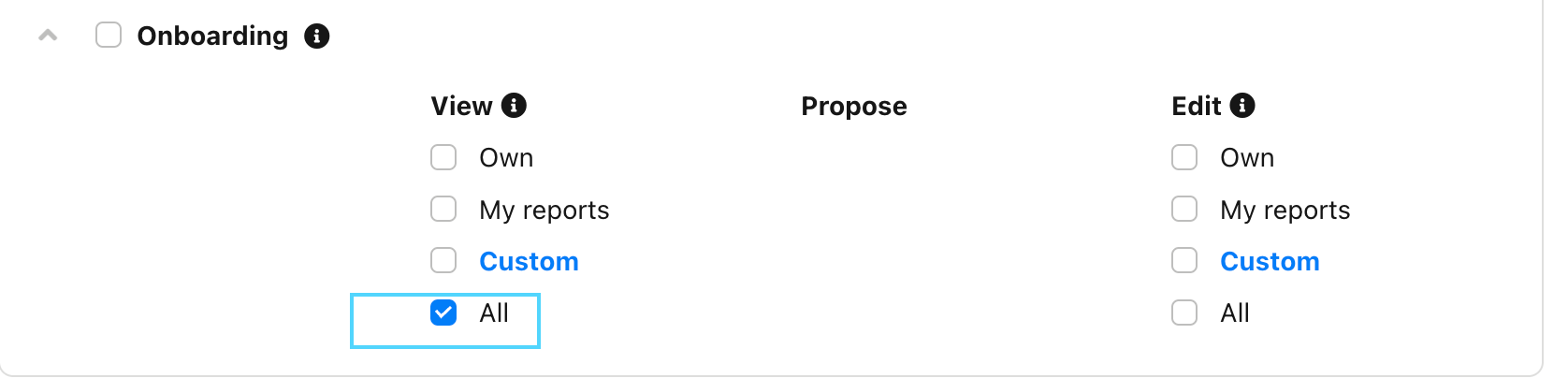
If the Supervisor has this as task, then only he will be able to see this taks. We do have to option to give to someone viewing rights to someone else taks, but unfortunately we cannot filter to give only viewing rights for only one step.
You can give viewing rights by going to Settings > Employee roles > relevant Employee role > Access rights > Onboarding:
Or Custom of you only wish to give Access rights of the Onboarding of one employee or a group of employees.
If the Supervisor has this as task, then only he will be able to see this taks. We do have to option to give to someone viewing rights to someone else taks, but unfortunately we cannot filter to give only viewing rights for only one step.
You can give viewing rights by going to Settings > Employee roles > relevant Employee role > Access rights > Onboarding:
Or Custom of you only wish to give Access rights of the Onboarding of one employee or a group of employees.
Thank you Sofia - yes the issue with the current situation is that the Information Security Manager can then see things he should not be able to see in terms of the employee’s record if I cannot isolate one step. I will put this forward as an idea.
⚠️Heads up! This thread could be outdated
This topic was created more than ago. Our product evolves fast – feel free to ask a new question to make sure you get the latest info.
Join the Personio Voyager Community!
If you are a Personio customer please use the same email address for registration as in your Personio account. By doing so we can help you faster if we might need to check something in your account.
Do you already have an account? > Login
! Your public username cannot contain any personal information such as email or other private information! You can't change your username after registration.