


Answer

Completed Review Cycle document not visible

  • September 4, 2025
  • 3 replies
  • 26 views

Forum|alt.badge.img+1

Hi all, 

We have a Development Report 2025 Review Cycle set up. Its status is active, but the colleagues who filled it out this year cannot access it any more. The filled out form simply does not appear in Review Cycles section.

They say everything was okay last week.

Do you have any suggestions?


Thank you, 

Vesna
Best answer by vesna_hr

We can mark this as resolved.

Thank you ​@Milan for your help. 

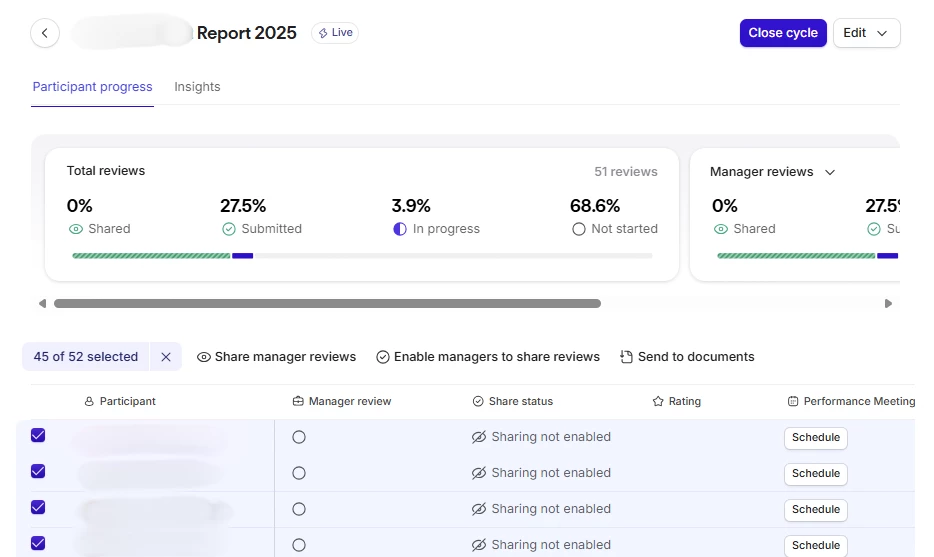
The solution is to pay attention to settings in your review cycle and make sure that managers are allowed to share the report.

If the option is not granted, you can always change it by going directly to the review cycle, put a check mark next to an employee and click Enable managers to share reviews.


3 replies

Milan
Community Moderator
Forum|alt.badge.img+3
  • Community Moderator
  • September 5, 2025

Hi ​@vesna_hr ,

Thank you for bringing this up! My name is Milan, and I’m the Product Manager for the Performance product here at Personio. I’d like to better understand the issue you’re experiencing. Please feel free to schedule some time with me through this link, so we can discuss it in detail.

Looking forward to helping you resolve this!


Forum|alt.badge.img+1
  • Author
  • Explorer
  • September 5, 2025

Hi Milan, 


Thank you very much for your super fast response.


Looking forward talking to you,

Vesna


Forum|alt.badge.img+1
  • Author
  • Explorer
  • Answer
  • September 8, 2025

We can mark this as resolved.

Thank you ​@Milan for your help. 

The solution is to pay attention to settings in your review cycle and make sure that managers are allowed to share the report.

If the option is not granted, you can always change it by going directly to the review cycle, put a check mark next to an employee and click Enable managers to share reviews.