




How can I manually adjust carryover days from last year?

Answered
Carryover paid vacations from last year manually adjusted
- Getting Started
Best answer by Lauraglendon
Hi
Thank you for reaching out, that’s a great question!
The first thing to do is check your carryover settings under Settings > Absences > Absence Type (Eg. Paid Vacation) > Accrual Settings. Please ensure that ‘Enable accrual policies?’ is set to ‘Yes’ and that the date limit is set to your company’s policies.
Once configured, you can option to manually adjust the employee’s carryover days by a certain amount, as in screenshot;
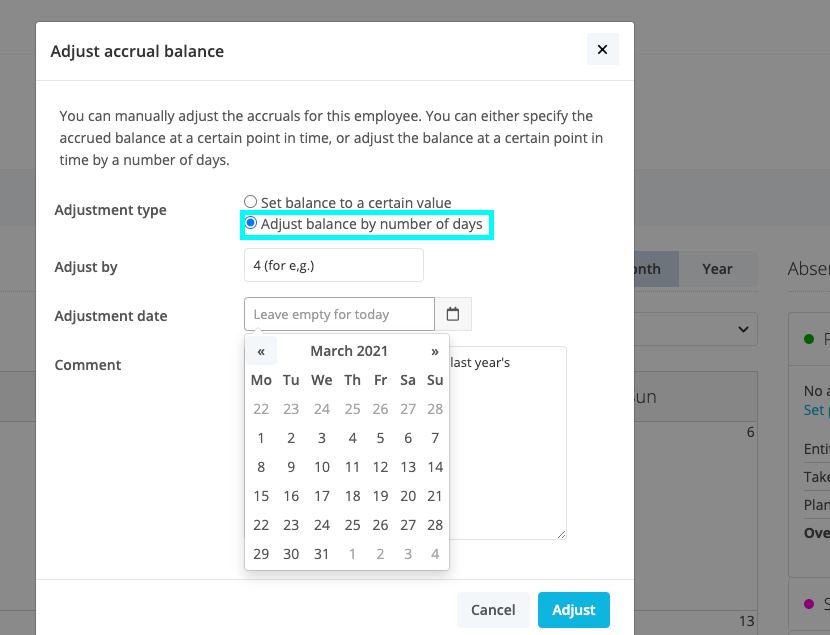
To do so, please follow the below steps:
- Go to the employee profile and click on the Absence tab. Find and select the absence type whose accrual balance you want to adjust (e.g. Paid vacation).
- Follow these few simple steps outlined under ‘Correction via Manual adjustments’, using the Adjust balance by a number of days option and ensuring that you add the adjustment date based on your carryover limit.
- If this adjustment is for several employees, I would recommend to use the ‘EN Accrual Balance Upload’ form, which can be found here to import this information manually.
- You also have the option to apply a different absence type, where you can add the carryover balance alone. To use this option, please follow these simple steps here.
If you have any questions on these options, please don’t hesitate to reach out!
Kindest regards,
Laura




Join the Personio Voyager Community!
If you are a Personio customer please use the same email address for registration as in your Personio account. By doing so we can help you faster if we might need to check something in your account. Do you already have an account? > Login
! Your public username cannot contain any personal information such as email or other private information! You can't change your username after registration.
Welcome to the Personio Voyager Community!
🎉 We've merged! The Personio Voyager Community now lives at community.personio.de.
This site (community.personio.com) is now read-only and will close soon, so you will no longer be able to log in here.
Coming from .com? Your account has already moved to community.personio.de. Log in there, and if it's your first time, set a new password first (your old .com password didn't carry over). See what to do →
Enter your E-mail address. We'll send you an e-mail with instructions to reset your password.