


I was on one of the Webinars
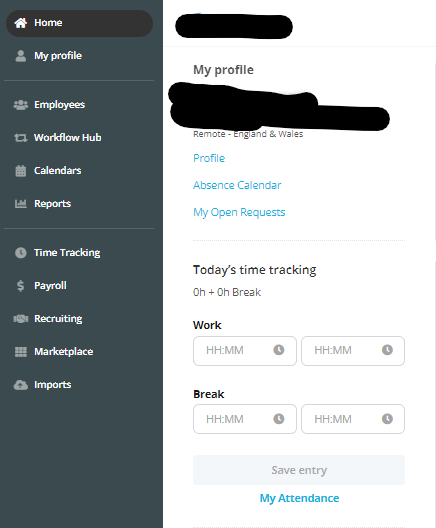
Was told that we can remove the ‘Time Tracking’ tile from the dashboard as we don’t use it.
I forgot what steps I needed to take.



 +19
+19I was on one of the Webinars
Was told that we can remove the ‘Time Tracking’ tile from the dashboard as we don’t use it.
I forgot what steps I needed to take.
Best answer by Daniele
Hi
I just asked a colleague about this:
If you do not track Attendance at all, you can just remove access to the Attendance Tab and the Time Tracking widget for your employees.
In order to take away the time tracking option, you will need to restrict access rights to the Attendance tab like so. You can do this by going to Settings > Employee Roles > Access Rights > Attendance data.
Once these access rights have been taken away, both the Attendance option on the navigation bar and the dashboard widget should not be present. (It is not possible to hide the widget only, while keeping access to the Attendance Tab - it’s both or none)
After you make these changes: employees with the role Administrator will see everything regardless of access rights. Administrators have exclusive access to all of Personio and you are unable to limit access rights for this employee role. However, other employees who have had the attendance data access rights taken away will not.
I hope this helps!
Don’t hesitate to get back if you have further questions :)
Best,
Daniele
If you are a Personio customer please use the same email address for registration as in your Personio account. By doing so we can help you faster if we might need to check something in your account. Do you already have an account? > Login
! Your public username cannot contain any personal information such as email or other private information! You can't change your username after registration.
🎉 We've merged! The Personio Voyager Community now lives at community.personio.de.
This site (community.personio.com) is now read-only and will close soon, so you will no longer be able to log in here.
Coming from .com? Your account has already moved to community.personio.de. Log in there, and if it's your first time, set a new password first (your old .com password didn't carry over). See what to do →
Enter your E-mail address. We'll send you an e-mail with instructions to reset your password.