Hi Community,
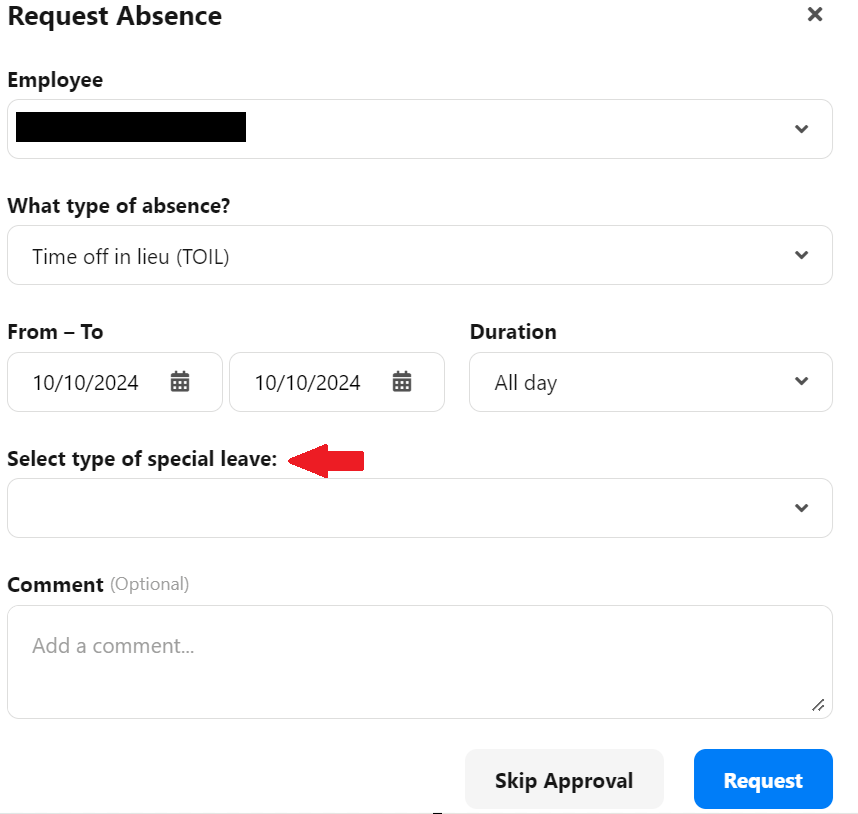
To the Absence type I created TOIL was recently a drop-down menu added but only for supervisors. We never had this before can anybody tell me how to deactivate this drop-down menu?

Hi Community,
To the Absence type I created TOIL was recently a drop-down menu added but only for supervisors. We never had this before can anybody tell me how to deactivate this drop-down menu?
Best answer by Weena
Hi
Do you have this extra field only for this specific Absence type or others as well?
This topic might require checking specific data on your account. In this case, I would suggest you create a support request via Help & Feedback.
Help & Feedback > Browse for help > Contact us
Through a support ticket, we will be able to log in into your account, check the settings together with you, and also verify if the topic might involve a system error. Be aware that only Account Owners can contact our Support team. In case you are not registered as such, please contact your colleagues in the role, or add this information to your account. You can find out how here.
Please let me know if there is anything else I can support you with.
I wish you a lovely afternoon. 🙌
Best,
Weena
If you are a Personio customer please use the same email address for registration as in your Personio account. By doing so we can help you faster if we might need to check something in your account. Do you already have an account? > Login
! Your public username cannot contain any personal information such as email or other private information! You can't change your username after registration.
🎉 We've merged! The Personio Voyager Community now lives at community.personio.de.
This site (community.personio.com) is now read-only and will close soon, so you will no longer be able to log in here.
Coming from .com? Your account has already moved to community.personio.de. Log in there, and if it's your first time, set a new password first (your old .com password didn't carry over). See what to do →
Enter your E-mail address. We'll send you an e-mail with instructions to reset your password.