
Dear Community,
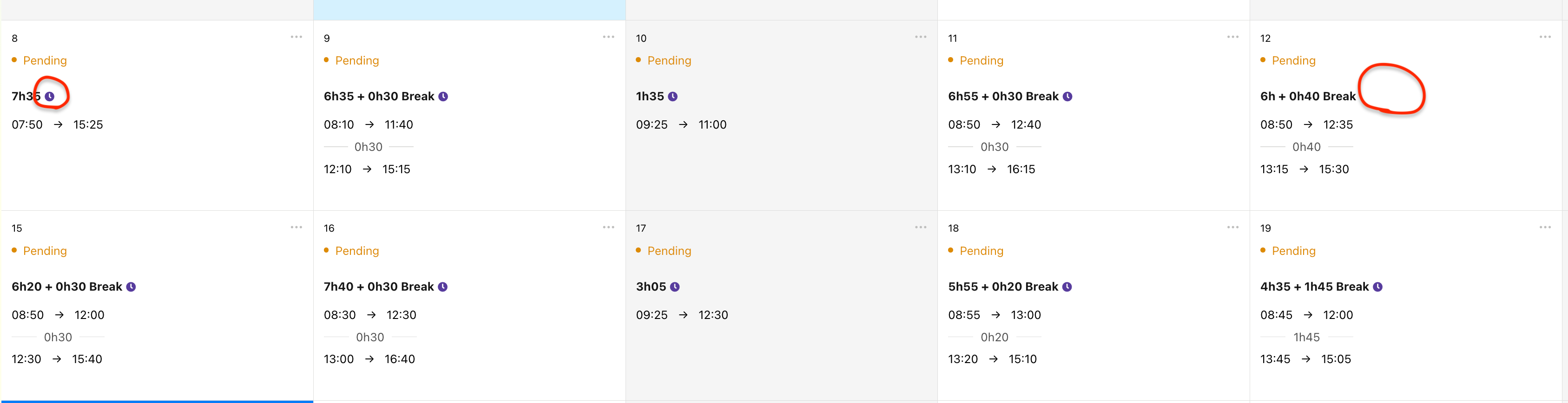
could you please help me to find out why the clock icon does not appear on the attendance calendar and the system calculates deficit hours for the day of 12th of January? Please see screenshot attached.



 +9
+9Dear Community,
could you please help me to find out why the clock icon does not appear on the attendance calendar and the system calculates deficit hours for the day of 12th of January? Please see screenshot attached.
Best answer by International Support Team
Hey
In some instances the system may not calculate the overtime/deficit hours correctly when the time tracking was first entered. Kindly delete and re-enter the time tracking data once again for the system to calculate this correctly.
If the problem continues, please let me know.
Best regards,
Conor
If you are a Personio customer please use the same email address for registration as in your Personio account. By doing so we can help you faster if we might need to check something in your account. Do you already have an account? > Login
! Your public username cannot contain any personal information such as email or other private information! You can't change your username after registration.
This is our service and networking community for all Personio users and HR Professionals. If you have not registered yet, please select "create an account"
Enter your E-mail address. We'll send you an e-mail with instructions to reset your password.

