I’d like to know if there’s a possibility to delete continous feedback once sent, because we made a test (with a good one haha), but it remains and it was a test to show an employee.
Even with the administrator role, it’s not possible.
Someone could help me?
Thanks in advance!
Best answer by mruscito
Hi @Irene Ng. !
Unfortunately, once feedback is submitted, it cannot be deleted. Even if you are working from an admin role with full access to the company account, it is not possible to delete a completed feedback.
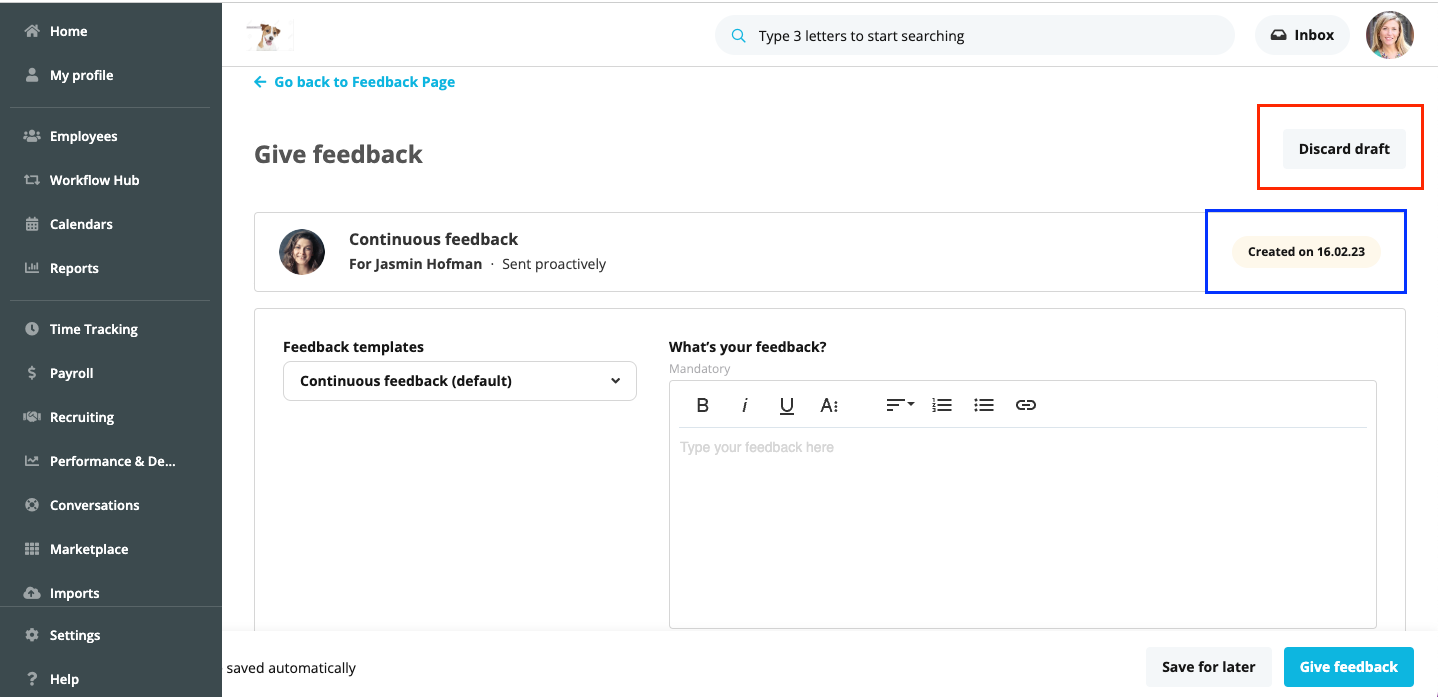
The only way to delete comments are if they are still in draft mode. If the date of creation is still in yelllow/orange, that means it has not been submitted and you are able to click on Discard draft. ⬇
This is also mentioned in our Helpcentre article on Continuous feedback, do check it out as it contains a great summary on how to use this area of Personio.
Unfortunately, once feedback is submitted, it cannot be deleted. Even if you are working from an admin role with full access to the company account, it is not possible to delete a completed feedback.
The only way to delete comments are if they are still in draft mode. If the date of creation is still in yelllow/orange, that means it has not been submitted and you are able to click on Discard draft. ⬇
This is also mentioned in our Helpcentre article on Continuous feedback, do check it out as it contains a great summary on how to use this area of Personio.
This topic was created more than ago. Our product evolves fast – feel free to ask a new question to make sure you get the latest info.
Join the Personio Voyager Community!
If you are a Personio customer please use the same email address for registration as in your Personio account. By doing so we can help you faster if we might need to check something in your account.
Do you already have an account? > Login
! Your public username cannot contain any personal information such as email or other private information! You can't change your username after registration.
Welcome to the Personio Voyager Community!
This is the support and networking community for Personio users and HR Professionals. If you have not registered yet, please select "create an account".