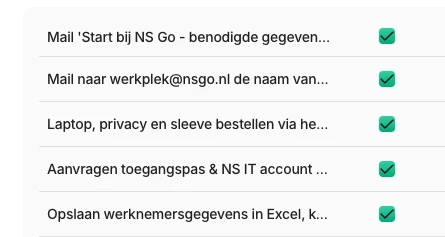
I a experiencing an issue with lines are too long Personio automatically shortens them. I can only see the full text when I hover over it with my cursor. Like we set in the onboarding step by step all kinds of lines with “to do” and these lines break when they are too long...Is there any way to expand or display the complete content without hovering? see below
Best answer by Daniele
Dear @Ginette,
I guess it is not possible to adjust the column width in this overview. I would encourage you to send this idea through the new ‘Give feedback’ feature directly in your Personio account. Submissions will be forwarded directly to the relevant product teams. You can find more information in this community post.
I guess it is not possible to adjust the column width in this overview. I would encourage you to send this idea through the new ‘Give feedback’ feature directly in your Personio account. Submissions will be forwarded directly to the relevant product teams. You can find more information in this community post.
Have a lovely day!
Daniele
⚠️Heads up! This thread could be outdated
This topic was created more than ago. Our product evolves fast – feel free to ask a new question to make sure you get the latest info.
Join the Personio Voyager Community!
If you are a Personio customer please use the same email address for registration as in your Personio account. By doing so we can help you faster if we might need to check something in your account.
Do you already have an account? > Login
! Your public username cannot contain any personal information such as email or other private information! You can't change your username after registration.
Welcome to the Personio Voyager Community!
This is the support and networking community for Personio users and HR Professionals. If you have not registered yet, please select "create an account".